Add a vehicle
Quick path
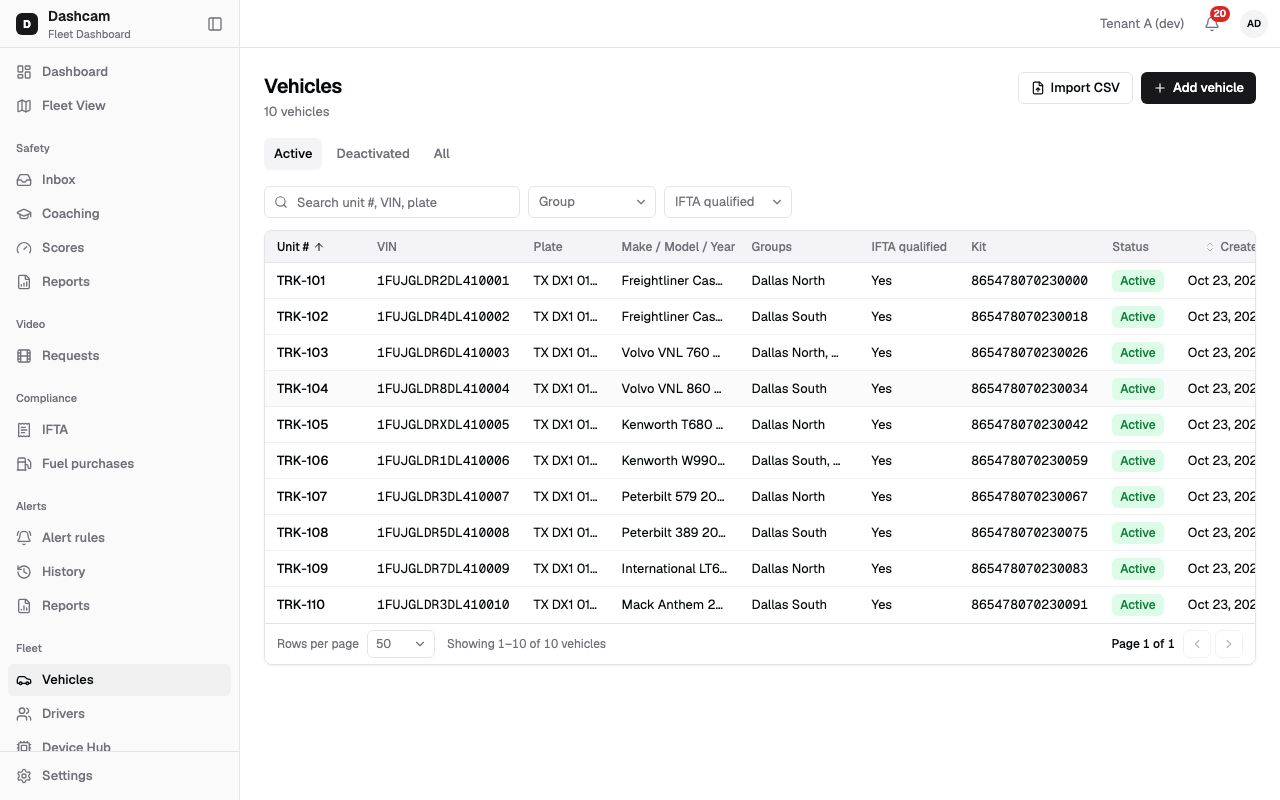
Section titled “Quick path”- Go to Fleet → Vehicles and click Add vehicle.
- Enter Unit # and the 17-character VIN; add the plate and its state if you know them.
- Fill in GVWR (lb) and Axles so the IFTA status is right.
- Pick Groups if you use them and click Add vehicle.
What it is and why
Section titled “What it is and why”Every truck you track in Roudiy starts as a vehicle record. The record is what a kit is paired with, what appears on the Fleet View map and what the IFTA report counts miles for. Without it, nothing the camera sends can be shown against a truck.
Example: your company buys a new Freightliner Cascadia for the Dallas North terminal. You add it as TRK-101 with its VIN, Texas plate and 80,000 lb GVWR. A Roudiy technician then installs a kit and pairs it with TRK-101, and from that moment the truck’s location, events and video show up under that unit number. See Vehicles, drivers and assignments for how the pieces fit together.
Before you start
Section titled “Before you start”- You need to add vehicles: by default only the Company Admin can. Dispatchers and Compliance Managers can edit vehicles but not add them; Safety Managers can only view them. A custom role may have other rights.
- Have the unit number and VIN at hand. The plate, weight and axle count come from the registration papers.
- If you use groups, create them first, for example Dallas North and Dallas South.
- Adding many trucks at once? Use Import vehicles from CSV instead.
The replay could not be loaded. The steps below still describe every action.
Step by step
Section titled “Step by step”-
Open the form.
Go to Fleet → Vehicles and click Add vehicle in the top-right corner. A drawer titled Add vehicle opens on the right, with the cursor already in Unit #.
-
Enter the unit number and plate.
- Unit # — required. The number your team uses for the truck, for example
TRK-101. Up to 20 characters. It must be unique in your company. - Plate — optional, up to 12 characters, for example
DX1 0101. - State — the 2-letter code of the plate’s state, for example
TX. Once you enter a plate, the state is required: an empty state shows Pick the plate state. You can clear it.
- Unit # — required. The number your team uses for the truck, for example
-
Enter the VIN.
VIN is required and is exactly 17 letters and digits, for example
1FUJGLDR2CSBB1234. While you type, letters turn upper case, spaces are removed and the field stops at 17 characters. A counter such as 12/17 shows how many you have. The letters I, O and Q are never used in a VIN; a wrong VIN shows VIN is 17 letters and digits, without I, O, Q. -
Add make, model and year (optional).
- Make and Model — up to 40 characters each, for example
FreightlinerandCascadia. - Year — 4 digits, from 1990 up to next year, for example
2022.
They are not required, but they make the truck easy to recognise in lists and reports.
- Make and Model — up to 40 characters each, for example
-
Fill in the IFTA fields.
- Fuel type — Diesel (the default), Gasoline, Propane, LNG, CNG, E85, Biodiesel or Other.
- GVWR (lb) — gross vehicle weight rating, from 1,000 to 200,000 lb, for example
80000. - Axles — from 2 to 9, for example
3.
Under the fields a live line shows the result, for example IFTA qualified: Yes, with the rule Auto-set: GVWR > 26,000 lb or 3+ axles. You do not set it yourself. When GVWR or axles is missing and the other value does not already qualify, it says No — missing GVWR/axles. Only IFTA qualified vehicles count in the IFTA report; see IFTA basics.
-
Choose the ECM connector, groups and notes.
- ECM connector — the engine port the KD032 gateway plugs into: Unknown (the default), 9-pin (Deutsch) or 16-pin (OBD-II). Leave Unknown if you are not sure.
- Groups — pick one or more groups, for example Dallas North. If your own access is limited to certain groups, you must pick at least one of your groups (Pick at least one of your groups); otherwise the field is optional.
- Notes — free text, up to 1,000 characters.
-
Save the vehicle.
Click Add vehicle. The drawer closes and a message confirms Unit TRK-101 added. If you click Cancel after typing, Roudiy asks Discard changes? — choose Discard to close or Keep editing to go back.
-
Find the new vehicle.
Type at least 2 characters of the unit number, VIN or plate in Search unit #, VIN, plate. The new row shows No kit in the Kit column until a kit is paired.
What happens next
Section titled “What happens next”- The vehicle is on the Active tab of Fleet → Vehicles. Clicking the row opens a side sheet with Live, History and Health buttons.
- A Roudiy technician installs the kit and pairs it with the truck. If you need to pair it yourself later, see Pair a kit with a vehicle.
- Once a kit reports, the truck appears on the Live map. A dispatcher can assign a driver on its Live tab at any time, with or without a kit.
If something goes wrong
Section titled “If something goes wrong”| Message on screen | Why | What to do |
|---|---|---|
| This vehicle already exists | Another active vehicle in your company uses this unit number or VIN. | Search the list for it. Use a different unit number, or edit the existing truck. |
| This vehicle already exists (deactivated). | The truck was added before and later deactivated. | Click Reactivate it to bring the old record back with its history. |
| VIN is 17 letters and digits, without I, O, Q | The VIN is shorter than 17 characters or contains I, O or Q. | Copy the VIN again from the registration papers. |
| Pick the plate state | You entered a plate but no state. | Pick the state, or clear the plate. |
| Pick at least one of your groups | Your access is limited to groups, so the truck must be in one of them. | Pick one of your groups. |
| Some groups no longer exist. Reload the form. | Someone deleted a group while the form was open. | Close the drawer, open Add vehicle again and pick the groups again. |
Questions
Section titled “Questions”Who fills in the IFTA qualified field? Nobody. Roudiy sets it from GVWR and axles: more than 26,000 lb or 3 or more axles makes the truck IFTA qualified.
Can I add a vehicle without a VIN? No. Unit # and VIN are both required.
Do I need to know the ECM connector? No. Leave it as Unknown if you are not sure.
Can a dispatcher add a truck? Not with the default role. Dispatchers can edit vehicles; adding them is for the Company Admin or a custom role with that right.