Import fuel purchases
Quick path
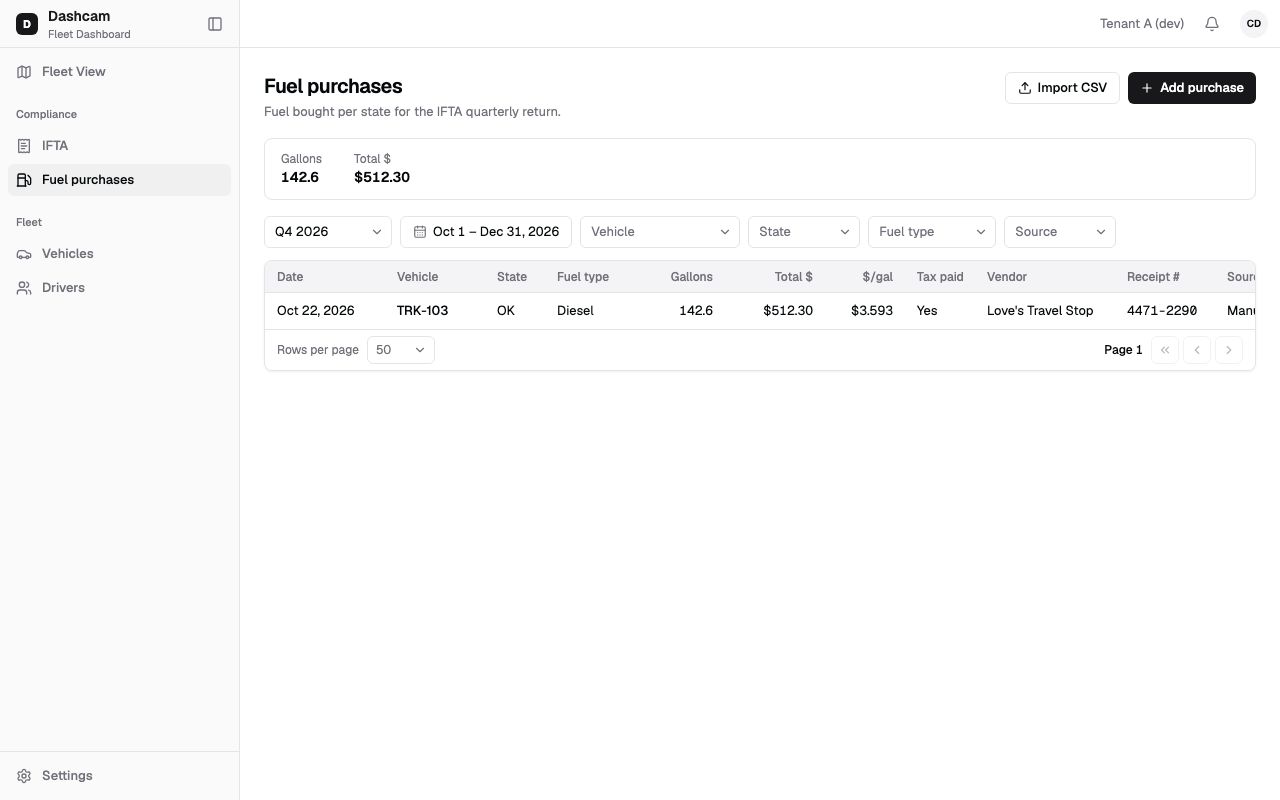
Section titled “Quick path”- On Compliance → Fuel purchases click Import CSV.
- Click Download template and fill in one row per receipt.
- Save as CSV (UTF-8), click Choose file and pick it. Keep it under 1 MB.
- Click Upload. If the file is rejected, fix the listed rows and upload again.
- Click Done.
What it is and why
Section titled “What it is and why”Most fleets get their fuel data from a fuel card, not from paper receipts. Instead of typing every receipt, copy the fuel-card export into the template and import it in one go. For example, at the end of August you paste the month’s receipts for TRK-101 to TRK-110 into the template and upload it: every row becomes a fuel purchase with Source CSV.
The file is imported all or nothing. Roudiy checks every row before it saves anything. If one row has an error, nothing is added and you get a list of errors by row and column. Fix them and upload the file again; there is nothing half-imported to clean up.
Before you start
Section titled “Before you start”- You need Fuel: import. By default the Company Admin and the Compliance Manager have it. See Roles and permissions.
- Every truck in the file must be in Roudiy and in your groups. Rows refer to trucks by unit number.
- Purchases cannot go into a locked quarter unless an amendment of that quarter is open.
The replay could not be loaded. The steps below still describe every action.
Step by step
Section titled “Step by step”-
Open the import dialog.
On Compliance → Fuel purchases click Import CSV. The dialog Import fuel purchases says Fill in the template, one row per receipt. The file is imported all or nothing.
-
Download and fill in the template.
Click Download template. You get
fuel-purchases-template.csvwith the header row and one sample row:date,unit_number,jurisdiction,fuel_type,gallons,total_cost_usd,tax_paid,vendor,city,receipt_ref2026-07-14,101,TX,diesel,120.5,450.12,Y,Pilot,Amarillo,R-1001Replace the sample with your receipts, one per row. Keep the column names exactly as they are; the order of the columns does not matter.
Column Required Format and example dateYes YYYY-MM-DD, for example2026-07-14. Not in the future.unit_numberYes The unit number of a truck in your groups. Upper or lower case does not matter. jurisdictionYes Two-letter code of one of the 48 states or DC, for example TX.fuel_typeNo For example dieselorgasoline. Empty means diesel.gallonsYes A number above 0 and up to 999.999, for example 120.5.total_cost_usdYes Dollars with up to 2 decimals, for example 450.12. A$sign is allowed.tax_paidNo YorN. Empty meansY, tax paid at the pump.vendorNo Up to 120 characters. cityNo Up to 80 characters. receipt_refNo The receipt or transaction number, up to 64 characters. The file has no note or time column. Add those later on the purchase if you need them.
-
Save and choose the file.
Save the spreadsheet as CSV (UTF-8). In the dialog click Choose file and pick it. Before you pick one, the dialog shows No file chosen · .csv up to 5 MB. In practice keep each file under 1 MB; split bigger files.
-
Upload.
Click Upload. The button shows Uploading… while Roudiy checks the file.
-
Check the result.
- Success: the dialog shows, for example, 42 purchases imported and the list refreshes. Click Done.
- Rejected rows: the dialog shows, for example, File rejected: 3 errors. Nothing was
imported. and a table with Row, Column and Error. Row is the line in your
file, and the header is line 1, so your first receipt is row 2. With many errors the dialog
shows only the first ones and says how many there are in total. Click Download errors (CSV) to save
fuel-import-errors.csvwith the columns row, column, code and error. - Wrong header: The header row doesn’t match the template. Nothing was imported. with Missing columns or Unknown columns listed.
What happens next
Section titled “What happens next”- The new purchases show up on Fuel purchases with Source CSV and count in the IFTA report of their quarter. A generated report of that quarter becomes Outdated; click Generate again on the IFTA report.
- Clicking Upload again for the same picked file does not import it twice. If you upload a file you already imported, its rows are rejected as duplicates, so nothing is doubled.
If something goes wrong
Section titled “If something goes wrong”The file is not accepted
| Message on screen | Why | What to do |
|---|---|---|
| Pick a .csv file | The file is not a .csv. | Save the spreadsheet as CSV (UTF-8). |
| File is too large (max 5 MB). Nothing was imported. | The upload is larger than Roudiy accepts at once. | Keep each file under 1 MB; split bigger files. |
| The file is empty / The file has no data rows. | The file has no content, or only the header. | Add at least one receipt row. |
| The header row doesn’t match the template. Nothing was imported. | A column was renamed, removed or added. | Download the template and copy your data into it. |
| a purchase in this file was added meanwhile; nothing was imported | Someone saved a matching purchase while you uploaded. | Upload again and remove the rows reported as duplicates. |
Typical row errors
The Error column usually shows Roudiy’s own message for the row, in lowercase, like these:
| Error in the table | What to do |
|---|---|
date is required (also unit_number, jurisdiction, gallons, total_cost_usd) |
Fill in the value. |
| date must be YYYY-MM-DD | Write dates like 2026-07-14; check how your spreadsheet saves dates. |
| date is in the future | Use the date on the receipt. |
| fuel_type must be one of … | Use one of the listed fuel types, or leave it empty for diesel. |
| gallons must be a number / gallons must be greater than 0 and at most 999.999 | Enter the gallons from the receipt. |
| total_cost_usd must be dollars with at most 2 decimals | Write the amount like 450.12. |
| tax_paid must be Y or N | Use Y, N or leave it empty. |
| vendor is longer than 120 characters | Shorten the text (city 80, receipt_ref 64). |
| no vehicle with unit number 101 | Fix the unit number, or add the truck first. It must be in your groups. |
| AK is not one of the 48 states + DC | Use the two-letter code of a state in the IFTA list. |
| same date, vehicle, gallons and state as row 5 | The file has the same receipt twice; remove one row. |
| a purchase with the same date, vehicle, gallons and state already exists | The receipt is already in Roudiy; remove the row. |
| quarter 2026-Q2 is locked | Remove the row, or start an amendment of that quarter first. |
Questions
Section titled “Questions”Some rows were fine. Why was nothing imported? The import is all or nothing. Fix the listed rows and upload the whole file again.
Can the import update purchases I already have? No. It only adds purchases. A row that matches an existing purchase is rejected; change existing purchases on the Fuel purchases page.
My fuel-card file is 3 MB. What now? Split it, for example by month or by group of trucks, so that each file is under 1 MB, and import the files one after another.