Lock a quarter and amend it
Quick path
Section titled “Quick path”- On Compliance → IFTA, open a quarter with the status Generated.
- Click Lock quarter, then Lock.
- To correct it later, click Start amendment, write a reason and click Create.
- Fix the fuel purchases, click Generate and check the Δ columns.
- Click Lock amendment, or Discard the draft.
What it is and why
Section titled “What it is and why”Once you file the IFTA return, the numbers in Roudiy should stay exactly as filed. Locking freezes the quarter: its fuel purchases and mileage cannot change any more, and the lock cannot be undone. If something turns up later, you file an amendment. It is a new version of the quarter that you generate and lock again; the original stays as it is.
Example: you filed Q3 2026 and locked it on October 20. In November you find Texas receipts for TRK-107 from August. You start Amendment 1, add the receipts, generate it, see what changed in Texas, lock the amendment and file it.
Before you start
Section titled “Before you start”- Locking needs Ifta: lock; starting and generating an amendment needs Ifta: generate. By default the Company Admin and the Compliance Manager have both. You also need access to all groups.
- The quarter must be Generated and not Outdated. See Build a quarterly IFTA report.
The replay shows a sample quarter, so every step is visible; your report uses your own trips and fuel purchases.
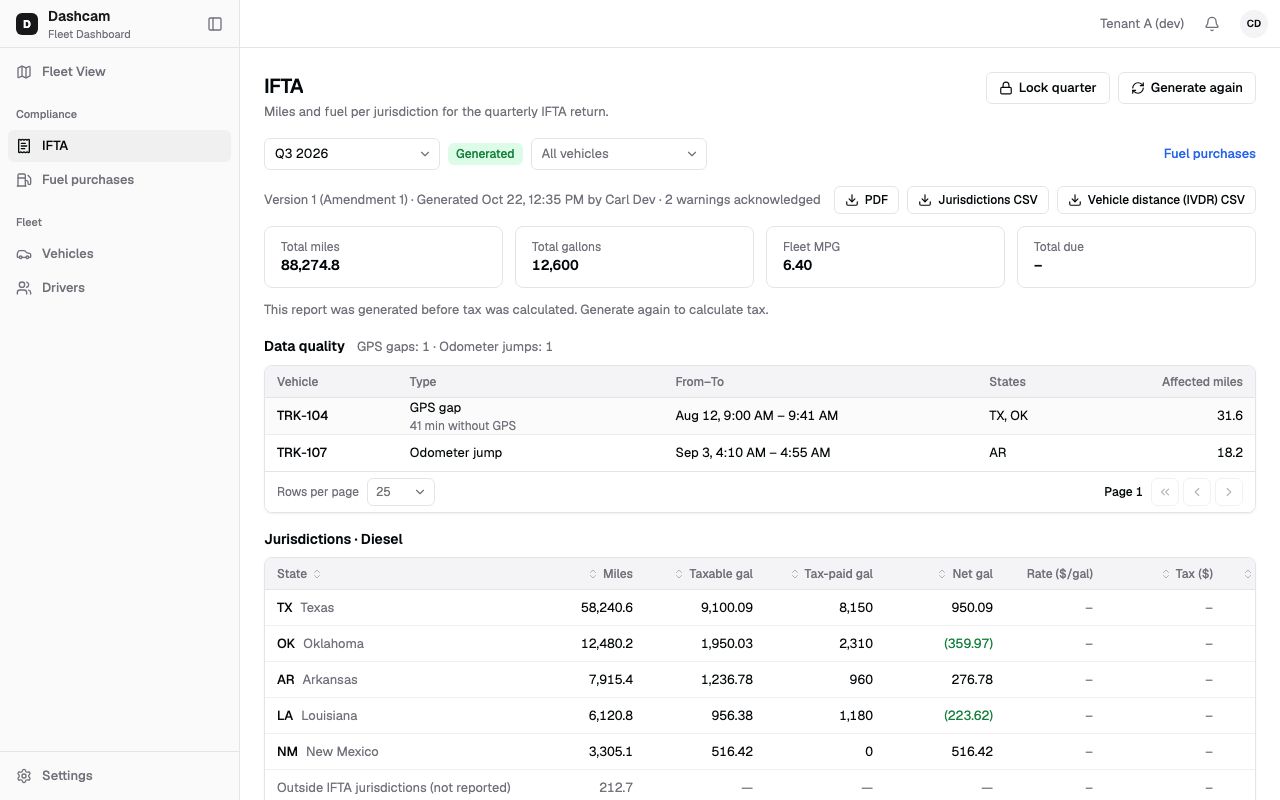
The replay could not be loaded. The steps below still describe every action.
Step by step
Section titled “Step by step”-
Lock the quarter.
Lock quarter appears when the status is Generated. It is disabled while the report is Outdated or data is still processing. Click it. The dialog Lock Q3 2026? says Locking Q3 2026 cannot be undone. Fuel purchases and mileage for this quarter will be frozen. Click Lock. You see Q3 2026 locked, and the header shows when and by whom it was locked.
-
Know what the lock does.
- The quarter’s fuel purchases show a lock icon; edit and delete are disabled with the tooltip Quarter Q3 2026 is locked.
- Mileage that arrives after the lock does not change the report. Roudiy counts it and shows a badge such as Late data after lock: 2 changes (1 change for one), so you know an amendment may be needed.
- There is no unlock. Later changes always go through an amendment.
-
Start an amendment.
On a locked quarter click Start amendment. The dialog Start amendment for Q3 2026 says The locked report stays as it is. The amendment is a new version you generate and lock again. Enter a Reason, for example Fuel receipts for TX found after the quarter was locked. Create stays disabled until the reason has 10 to 500 characters; the counter below the field shows your length, for example 42/500. Click Create. You see Amendment 1 started.
Roudiy then recalculates the quarter’s mileage, so late data becomes miles. Meanwhile the banner says Recalculating the quarter’s mileage with the data that came after the lock. Generate is available in a minute.
-
Make your corrections.
While the draft is open, the banner Amendment in progress says Fuel purchases for this quarter can be edited. and shows your reason. Use its Fuel purchases link to add, edit, delete or import the quarter’s purchases; the lock icons are gone while the amendment is open.
-
Generate the amendment.
Click Generate. No warning confirmation is needed here. You see Amendment 1 generated. The table adds Δ Miles, Δ Taxable and Δ Net columns and marks changed states with Changed; a state that dropped out shows 0 miles. The changes are compared with the latest locked version, and tax is recalculated with the current rates. If nothing changed, you see No changes compared to the previous version. After more corrections, click Generate again.
-
Lock the amendment, or discard it.
- Lock amendment: the dialog Lock Amendment 1? says it cannot be undone, that its PDF is marked AMENDED and that earlier versions stay as they are. Click to confirm; you see Amendment 1 locked.
- Discard: the dialog Discard Amendment 1? says Fuel purchase changes will stay and can be used in a new amendment. You see Amendment 1 discarded.
-
Switch between versions.
When a quarter has more than one version, a Version list appears with labels such as Original, Amendment 1 (Locked) and Amendment 2 (Draft), and a line saying who locked or generated it. If you look at another version while a draft is open, a banner offers View Amendment 2.
What happens next
Section titled “What happens next”- Export the locked amendment and file it; see Export the IFTA return. Its PDF carries the AMENDED line and your reason.
- Only one amendment per quarter can be open at a time. After you lock or discard it, you can start another one.
If something goes wrong
Section titled “If something goes wrong”| Message on screen | Why | What to do |
|---|---|---|
| Generate the report before locking the quarter | The quarter has no generated report. | Generate it first. |
| Data changed after the report was generated. Generate again before locking. | The report is Outdated. | Click Generate again, check it, then lock. |
| Only users with access to all groups can lock the quarter | Your access is limited to some groups. | Ask your Company Admin for access to all groups. |
| Only users with access to all groups can amend the report | The same, for amendments. | Ask your Company Admin for access to all groups. |
| Start amendment disabled: Amendment 1 is still open | An amendment is already open. | Open it with Version, then lock or discard it. |
| An amendment of this quarter is already open | Same as above. | Finish the open amendment. |
| Only a locked quarter can be amended | The quarter is not locked yet. | No amendment needed: change the data and click Generate again. |
| This version is locked | You tried to change a locked version. | Start a new amendment. |
Questions
Section titled “Questions”Can I unlock a quarter? No. Locking cannot be undone. Use an amendment.
Does an amendment change the original report or its files? No. The original and earlier amendments stay as they are; the amendment is a new version.
What happens to fuel purchase changes if I discard the amendment? They stay, and you can use them in a new amendment.
Do I need to tick the data-quality warnings again for an amendment? No. Generating an amendment does not ask for that confirmation.