Vehicle health
Quick path
Section titled “Quick path”- Open the vehicle and go to its Health tab.
- Check Active fault codes — critical codes are listed first.
- Open Resolved in last 30 days to see what cleared recently.
- Click View full history for older codes, and read the Telematics card for the latest values.
What it is and why
Section titled “What it is and why”The KD032 gateway plugs into the truck’s engine (ECM) port and reports fault codes and engine values to Roudiy. The Health tab collects them in one place so you can decide whether a truck needs the shop before its next load. Example: the Live tab of TRK-105 shows 1 active fault code · 1 critical. You open Health, see a Critical J1939 code first seen this morning and last seen 5 minutes ago, and pull the truck off the road.
A camera alone does not read engine data — the KD032 is needed. See Kits and cameras.
Before you start
Section titled “Before you start”- You need the
health.viewpermission. By default the Company Admin and Dispatcher have it; the Safety Manager and Compliance Manager do not. Without it the tab is hidden, and opening it by link shows You don’t have access to this page. - The truck needs a paired kit with a KD032 gateway connected to the engine.
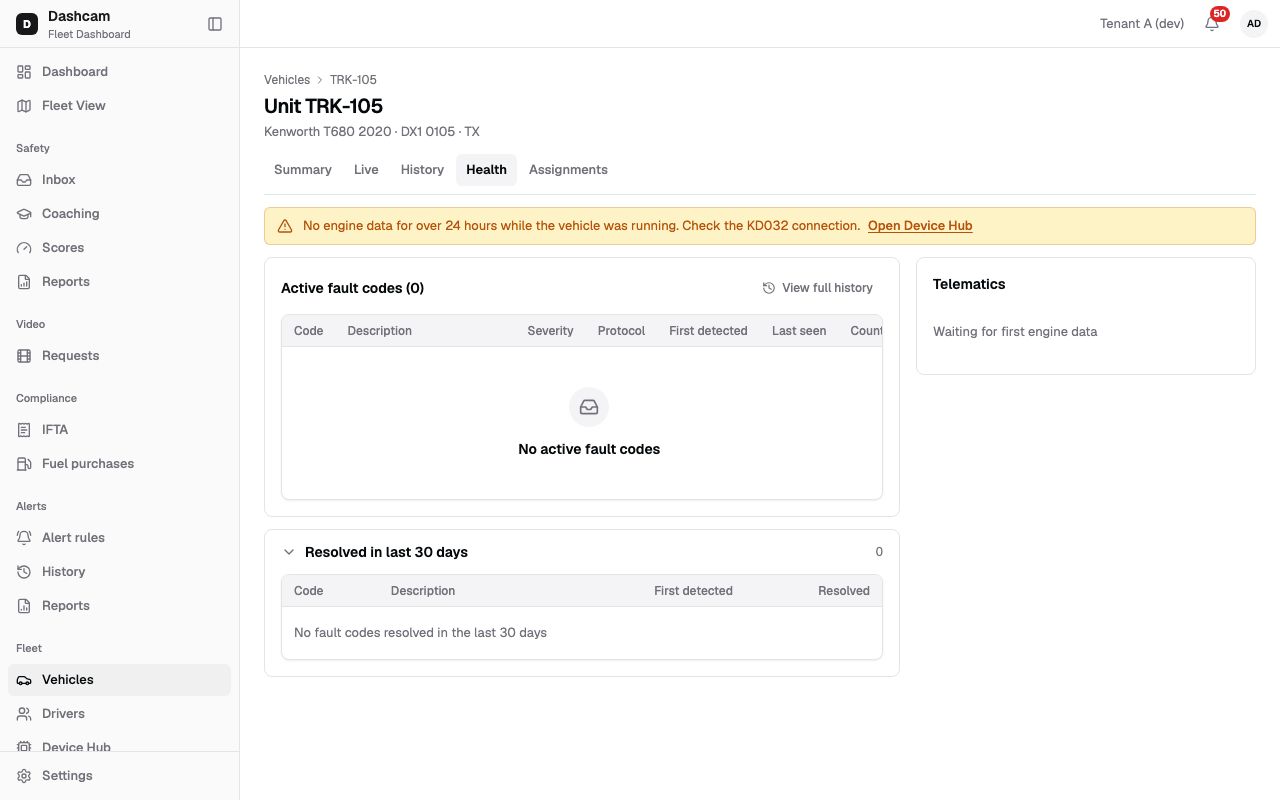
The replay could not be loaded. The steps below still describe every action.
The demo kit sends no engine data, so the replay shows no fault codes, the stale engine data banner and Waiting for first engine data. The steps below describe a truck that reports.
Step by step
Section titled “Step by step”-
Open the Health tab.
On the vehicle page, click Health. You can also get here from Open Health on the Live tab or the Open faults count on the Summary tab. The tab loads on open and refreshes every 60 seconds.
-
Read the banners.
If the engine sent nothing for over 24 hours while the truck was running, a banner says No engine data for over 24 hours while the vehicle was running. Check the KD032 connection. with Open Device Hub. If a refresh fails, you see Health data didn’t refresh — showing the last loaded values. with Retry.
-
Check active fault codes.
The Active fault codes (2) table has Code, Description, Severity (Critical, Warning or Info), Protocol (J1939, OBD-II or Unknown), First detected, Last seen and Count. Critical codes come first, then warnings, then info, newest first in each. Hover Last seen for the exact time. With none, it says No active fault codes.
-
Look at resolved codes.
Resolved in last 30 days is open by default and shows a count. Its columns are Code, Description, First detected and Resolved. Click the header to collapse it. Empty: No fault codes resolved in the last 30 days.
-
Open the full history.
Click View full history. The dialog Fault code history — Unit TRK-105 has a Status filter (All statuses, Active, Resolved) and a date range (Any date, up to 366 days). Columns are Code, Description, Severity, First detected and Resolved (reads Active if not resolved). It shows 25 rows; click Load more for the next 25.
-
Read the Telematics card.
The header says, for example, Last updated 2m ago · refreshes every 60 s. Rows: Odometer, Fuel level, Coolant temp, Battery, Engine RPM, Speed, Engine hours, DEF level and VIN. A value the device does not report shows Not available; hover it to see Not reported by this device.
What happens next
Section titled “What happens next”- Codes move from Active fault codes to Resolved in last 30 days when they clear.
- Alerts for fault codes are set up in alert rules, with Critical, Warning or Info as the trigger.
If something goes wrong
Section titled “If something goes wrong”| Message on screen | Why | What to do |
|---|---|---|
| No device installed on this vehicle | No kit, no engine data and no faults yet. | Codes appear once a kit with a KD032 is installed. See Device Hub. |
| No engine data for over 24 hours while the vehicle was running. | The KD032 sent nothing while the truck ran. | Click Open Device Hub and check the KD032 connection. |
| Waiting for first engine data | The KD032 has not reported yet. | Wait for the truck to run; check the install if it stays. |
| Last device removed — showing its last values. | The kit was unpaired; you see what it last sent. | Pair a new kit if the truck is still in service. |
| Could not load vehicle health | The tab did not load. | Click Retry. |
Questions
Section titled “Questions”Why does Engine hours show “—”? The tab shows Not available when the device says it does not report a value, and “—” when no value came in.
How long are resolved codes listed on the tab? 30 days. Older ones are in View full history.
Can the Safety Manager see Health?
Not with the default role. A custom role with health.view can.