Create a custom role
Quick path
Section titled “Quick path”- Open Settings → Roles.
- In the menu of a system role, choose Duplicate (or click Create role).
- Name the role and tick its permissions.
- Click Create role, then give the role to users in Edit user & access.
What it is and why
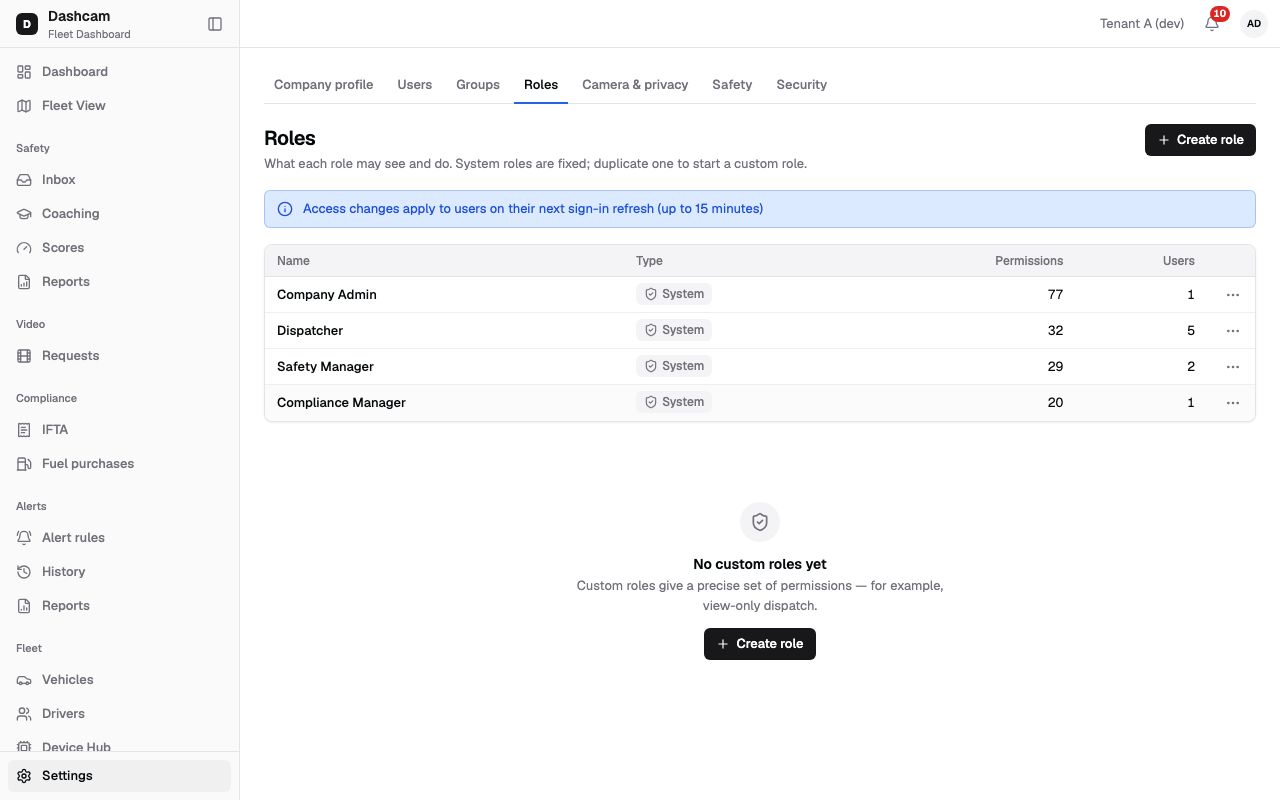
Section titled “What it is and why”Roudiy comes with four system roles: Company Admin, Dispatcher, Safety Manager and Compliance Manager. They are fixed and cover most teams. When one gives too much or too little, you make a custom role: your own name and an exact set of permissions. The page puts it this way: Custom roles give a precise set of permissions — for example, view-only dispatch.
For example, a night-shift helper in Dallas North should watch the map but not change anything. You duplicate Dispatcher, name the copy Dispatcher view-only, untick the permissions that create or change data, and give Emma Walsh Dispatcher view-only · Dallas North next to a system role. What each permission does is listed in Roles and permissions.
Before you start
Section titled “Before you start”- You need the Company Admin role or another role with the
roles.createpermission. To see the page you needroles.list. - A company can have at most 50 custom roles.
- Know how roles and groups combine: Groups and access.
The replay could not be loaded. The steps below still describe every action.
Step by step
Section titled “Step by step”-
Start from a system role.
Open Settings → Roles. The banner reminds you: Access changes apply to users on their next sign-in refresh (up to 15 minutes). The table shows Name, Type (System or Custom), the number of Permissions and the number of Users.
System roles have only Duplicate in their menu; they can’t be edited. Choose Duplicate on the role closest to what you need, for example Dispatcher. The dialog Duplicate Dispatcher opens. The copy starts with all of Dispatcher’s permissions already ticked. To start with an empty role, click Create role instead.
-
Name the role.
Name (required, up to 50 characters). A duplicate starts as Copy of Dispatcher; replace it with something clear, for example Dispatcher view-only. Names must be unique, otherwise you see A role with this name already exists.
-
Pick the permissions.
The heading shows the count, for example Permissions (12 selected). Permissions are grouped by module, in alphabetical order (Alerts, Assignments, Audit log, Billing, Coaching, Company, … Vehicles, Video).
- Each permission shows its key (for example
fleetview.view) and a short description. - Select all in module ticks every permission of that module.
- An orange Sensitive tag marks the three permissions that touch privacy or the hardware:
video.driver_facing(driver-facing camera),devices.command.dangerous(commands such as a reboot) andsafety.events.confidential(confidential events). Give them only to people who need them.
- Each permission shows its key (for example
-
Save the role.
Click Create role. You see Role Dispatcher view-only created. The new role appears in the table with the type Custom. Its menu has Edit, Duplicate and Delete; editing later shows Role saved.
-
Give the role to users.
Open Settings → Users, choose Edit user & access on the user and add a row with the new role and a group. A user always needs at least one system role, so a custom role is added next to one. See Change a user’s access.
What happens next
Section titled “What happens next”- Users with the role get its permissions on their next sign-in refresh, up to 15 minutes. The same applies when you edit the role later.
- The role is offered in the Role list of access rows, marked Custom role.
If something goes wrong
Section titled “If something goes wrong”| Message on screen | Why | What to do |
|---|---|---|
| A role with this name already exists | Another role has the same name. | Choose a different name. |
| A company can have at most 50 custom roles | You already have 50 custom roles. | Delete a custom role nobody uses, or edit an existing one. |
| System roles can’t be changed — duplicate it instead | You tried to change a system role. | Use Duplicate and change the copy. |
| Role is assigned to 2 users. | You tried to delete a role that users still have. | Click View users, give them another role, then delete. |
| Add at least one system role (in the user dialog) | The user would have only custom roles. | Keep a system role row next to the custom one. |
Questions
Section titled “Questions”Can I change what Dispatcher may do? Not directly: system roles are fixed. Duplicate it and change the copy.
Can a user have only my custom role? No. Every user needs at least one system role among their access rows.
What are the Sensitive permissions?
video.driver_facing, devices.command.dangerous and safety.events.confidential. They are
marked so you think twice before giving them.