Add a fuel purchase
Quick path
Section titled “Quick path”- Open Compliance → Fuel purchases and click Add purchase.
- Fill in Date, Vehicle, State, Gallons and Total cost $.
- Leave Tax paid at the pump ticked for normal retail fuel.
- Add Vendor, City and Receipt # if you have them.
- Click Add purchase.
What it is and why
Section titled “What it is and why”IFTA tax is owed where fuel is burned, but you get credit for the tax you already paid at the pump in each state. So the IFTA report needs every fuel receipt: which truck, which state, how many gallons, and whether tax was paid. Roudiy takes the gallons for each quarter from this page.
Example: on July 14 James Carter fills TRK-104 with 120.5 gallons of diesel at Love’s in Amarillo, TX, for $452.10. You add the receipt here, and it counts as tax-paid gallons in Texas in the Q3 2026 report. If you have many receipts, for example a fuel-card export, use Import fuel purchases instead.
Before you start
Section titled “Before you start”- By default the Company Admin and the Compliance Manager can add, edit, import and delete purchases. The Dispatcher can only view the list. The Safety Manager has no access. See Roles and permissions.
- You see purchases, and can pick vehicles, only in your own groups.
- The truck must already be in Roudiy. Deactivated trucks can still be picked; they are marked Deactivated.
- Amounts are in US dollars only. There is no receipt image upload; Receipt # is a text reference.
The replay could not be loaded. The steps below still describe every action.
Step by step
Section titled “Step by step”-
Open the page.
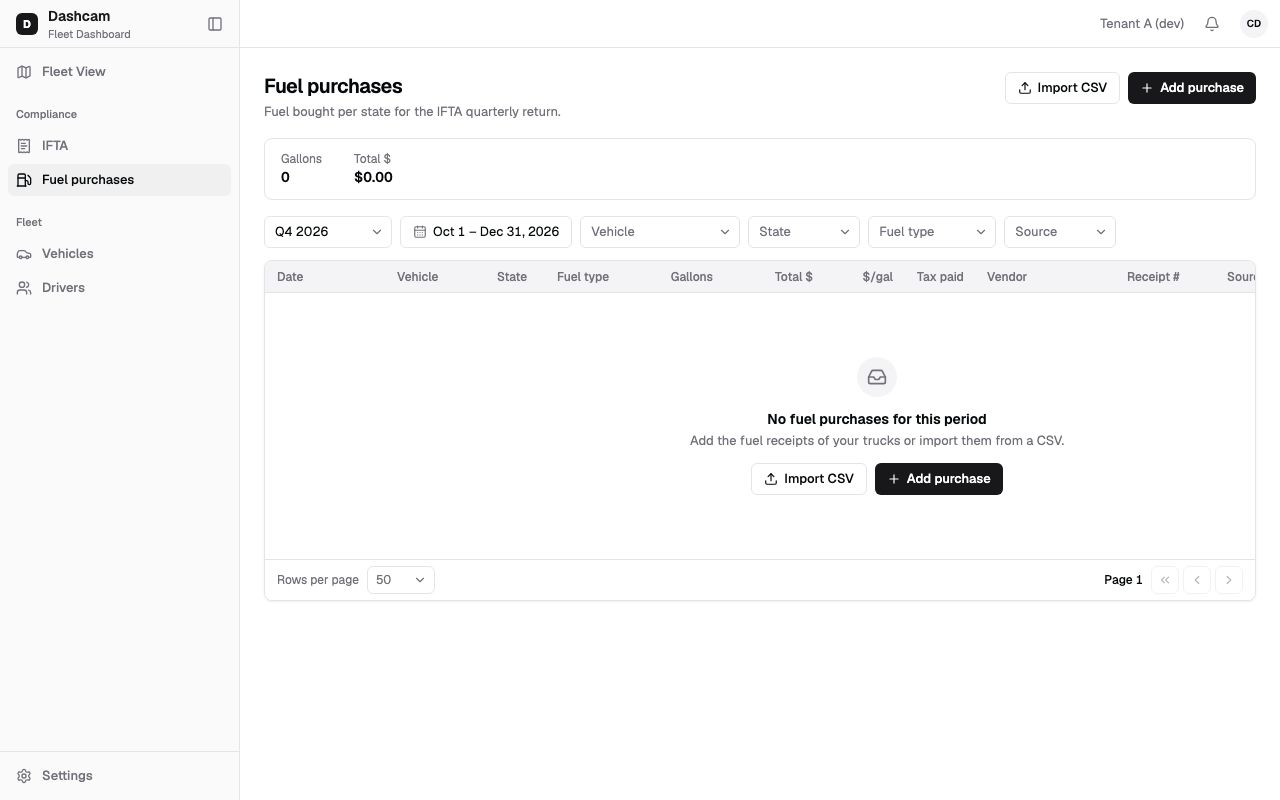
Click Compliance → Fuel purchases. The header reads Fuel bought per state for the IFTA quarterly return. Under it, the totals strip shows Gallons and Total $ for everything that matches the filters, not only the page you see.
The table has Date, Vehicle, State, Fuel type, Gallons, Total $, $/gal, Tax paid, Vendor, Receipt #, Source (Manual or CSV) and Added by. Rows are sorted newest first, 50 per page. There is no search box, and the columns cannot be sorted.
-
Narrow the list if you need to.
- Quarter: the current quarter and the 5 before it. The page opens on the current quarter.
- Dates: any date range.
- Vehicle, State (48 states + DC), Fuel type and Source (Manual or CSV).
The filters stay in the page address, so a bookmark or a shared link opens the same view.
-
Click Add purchase.
The dialog Add purchase opens. If you close a dialog with changes, Roudiy asks Discard changes? so nothing is lost by a stray click.
-
Fill in the form.
Field Required What to enter Date Yes The day of the receipt, in your company time zone. Not in the future. Time No The time on the receipt, if you want it. Vehicle Yes Search by unit number, for example TRK-104. State Yes Where you bought the fuel: one of the 48 states or DC. Alaska and Hawaii are not in the list. Fuel type No Diesel by default; also Gasoline, Propane, LNG, CNG, E85, Biodiesel, Other. Gallons Yes More than 0 and up to 999.999, with up to 3 decimals, for example 120.5. Total cost $ Yes Dollars with up to 2 decimals, for example 452.10. A $sign and commas are fine; 0 is accepted.Tax paid at the pump – Ticked by default. Untick it only for fuel bought without state fuel tax. Vendor No The station, for example Love’s #512. Up to 120 characters. City No Up to 80 characters. Receipt # No The receipt or transaction number, up to 64 characters. It helps when an auditor asks for the receipt. Note No Anything else, up to 500 characters. -
Save.
Click Add purchase. You see Purchase of 120.5 gal added and the row appears with Source Manual. Clicking twice does not create two purchases.
-
Edit or delete a purchase.
Click the edit icon on a row to open Edit purchase, change what you need and click Save: you see Purchase saved. Click the delete icon to remove a purchase. The confirmation shows the truck, state and amount and says This can’t be undone. Click Delete; you see Purchase deleted.
What happens next
Section titled “What happens next”- The purchase counts in the IFTA report of its quarter, for its fuel type and state.
- If that quarter’s report was already generated, any add, edit or delete makes it Outdated. Open the IFTA report and click Generate again.
- When a quarter is locked, its rows show a lock icon in Date, and edit and delete are disabled with the tooltip Quarter Q3 2026 is locked. To change them, start an amendment; while it is open, the rows can be edited again.
If something goes wrong
Section titled “If something goes wrong”| Message on screen | Why | What to do |
|---|---|---|
| Required | A required field is empty. | Fill in the field. |
| The date can’t be in the future | The date is after today. | Use the date on the receipt. |
| Gallons: more than 0, up to 999.999 | Gallons is 0, negative or too large. | Enter the gallons from the receipt. |
| Enter an amount in dollars, e.g. 452.10 | The amount is not a dollar value with up to 2 decimals. | Enter it like 452.10. |
| Not an IFTA jurisdiction (48 states + DC) | The state is not one of the 48 states or DC. | Pick the state where the fuel was bought. |
| Vehicle not found | Roudiy could not find the truck you picked. | Pick the truck again, or ask your Company Admin about your groups. |
| A purchase with the same date, vehicle, gallons and state already exists | Roudiy treats the same date, truck, gallons and state as one purchase. The amount is not compared. | Click Open existing and check it before adding again. |
| This quarter is locked | The date falls in a locked quarter. | Start an amendment first. |
| Purchase was changed in another tab | Someone saved this purchase after you opened it. | Click Reload and make your change again. |
| This purchase was already deleted | Someone else deleted it first. | Nothing; the list refreshes. |
| Couldn’t load purchases | The list did not load. | Click Retry. |
| No fuel purchases for this period | Nothing is recorded for the chosen dates. | Pick another Quarter, or add or import purchases. |
Questions
Section titled “Questions”Can I attach a photo of the receipt? No. Keep the receipt yourself and type its number into Receipt #.
Our truck filled up twice on the same day with the same gallons. What now? Roudiy refuses the second one as a duplicate, even if the amount differs. Use Open existing to check the first one.
Does a deleted purchase still count in IFTA? No. It disappears from the list and from the quarter’s numbers, and a generated report of that quarter becomes Outdated.
Why can’t our dispatcher add purchases? By default the Dispatcher can only view them. A Company Admin can give a custom role more rights.